What Should You Know Before Buying a New Printer?
1 Views
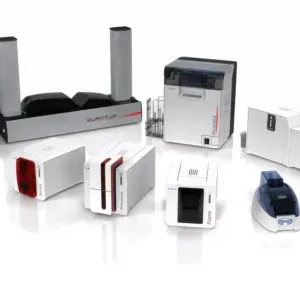
Buying a new printer for business identification is different from purchasing an ordinary office printer. Standard printers are designed primarily for paper documents, while plastic card printing requires specialised equipment, compatible materials and suitable software.
Schools, businesses, clubs and event organisers often need professional cards containing photographs, names, barcodes or membership information. Selecting appropriate equipment can make issuing these cards more convenient and consistent.
Before investing in card printers, buyers should understand their printing requirements, expected card volumes and the features different machines offer.
The right purchase can help an organisation manage identification needs without paying for unnecessary functions.
Identify What You Need the Printer to Produce
The first step is defining the cards your organisation intends to issue.
Employee and Visitor Cards
Businesses may need identification cards containing employee names, photographs, positions and company branding.
Visitor cards may require different information, such as visit dates or access categories.
Membership and Loyalty Cards
Clubs, gyms and retail businesses often use plastic cards for membership identification or loyalty programs.
These applications may require individual membership numbers, barcodes or other personalised details.
Student Identification
Educational institutions may need cards displaying photographs, student information and identification numbers.
Consider Future Requirements
A printer purchased for basic identification may eventually need to support additional applications.
Ask whether future requirements could include:
-
Double-sided printing.
-
Barcode or QR code printing.
-
Magnetic stripe encoding.
-
Contactless smart card encoding.
-
Larger printing volumes.
-
Integration with existing databases.
Planning ahead can help avoid premature equipment replacement.
Understand the Main Types of Card Printers
Plastic card machines use different printing technologies.
Direct-to-Card Printing
Direct-to-card printers transfer images and text onto compatible card surfaces using specialised ribbons.
They are commonly used for employee IDs, student cards and membership applications.
These machines may provide a practical option for routine card personalisation.
Retransfer Printing
Retransfer printers first print an image onto a special film before applying it to the card.
This process can be useful for certain card materials and designs requiring extensive surface coverage.
However, consumable costs and equipment requirements differ from direct-to-card printing.
How to Select a Printer for Plastic Cards
A printer for plastic cards should match the card material, intended design and production volume.
Check Card Compatibility
Many machines use standard PVC cards, but supported thicknesses and materials can vary.
Specialised cards may require additional compatibility checks.
Compare Print Quality
Image resolution affects how photographs, logos and small text appear.
However, the final result also depends on artwork quality, card surfaces and compatible ribbons.
Evaluate Printing Speed
A small business issuing occasional replacement badges has different requirements from an organisation producing hundreds of cards regularly.
Why Manufacturer Speed Figures Need Context
Published output speeds may vary according to:
-
Colour versus monochrome printing.
-
Single-sided or double-sided output.
-
Encoding requirements.
-
Design complexity.
-
Production settings.
Compare specifications using the type of card your organisation actually intends to produce.
Consider Software and Connectivity
The printing machine is only one part of the overall system.
Card Design Software
Dedicated software helps users position photographs, names, logos and identification details.
Some applications also support importing information from spreadsheets or databases.
Computer Compatibility
Check the supported operating system and available connections.
USB and network connectivity may be available depending on the model.
Businesses purchasing card printers should also confirm whether several authorised users need access to the same equipment.
Understand the Ongoing Cost of Printing
The purchase price should not be the only consideration.
Card printing requires consumables, and these affect the cost of each finished card.
Common Operating Expenses
These may include:
-
Blank plastic cards.
-
Colour or monochrome ribbons.
-
Retransfer film where applicable.
-
Cleaning kits.
-
Replacement parts.
-
Software licences or upgrades.
A less expensive printer may have higher consumable costs for certain applications.
Calculate an estimated cost per card before purchasing.
What About Security and Card Durability?
Some organisations require additional features beyond basic printed identification.
Encoding Options
Magnetic stripe and contactless smart card encoding may be available on compatible equipment.
Printing a card's visible design does not automatically programme its electronic credentials.
Laminated Cards
Selected systems support lamination to provide additional surface protection.
The appropriate solution depends on expected card use and security requirements.
Businesses comparing card printers australia should determine whether their organisation needs ordinary identification or a more specialised credential system.
Why Choose InteractCard?
InteractCard supplies Evolis plastic card printing equipment, software and related consumables.
Customers researching card printers australia can explore models such as the Evolis Zenius 2, Primacy 2 and other specialised printing systems.
The business also offers ribbons, blank cards, cleaning kits and printing accessories.
This range allows buyers to compare equipment and associated supplies according to their intended application.
About Us – InteractCard
InteractCard is an Australian supplier of plastic ID card printers and card personalisation products.
The business distributes and supports Evolis printing equipment across Australia and the wider region.
Its range covers identification printers, design software, consumables and accessories used in education, workplaces, membership organisations and other sectors.
Conclusion
Buying a new plastic card printer requires a clear understanding of the cards being produced and the volume of printing expected.
Printing technology, software compatibility, consumable costs and security features all influence the decision.
Before selecting a printer for plastic cards, compare machines against the organisation's actual requirements.
A carefully selected system can support convenient card issuance while keeping unnecessary equipment expenses under control.
Related Reading
Top 10 Hidden Secrets About Business & Finance You Need to Know
Welcome to our in-depth exploration of Business & Finance. In an era defined...
Why Business & Finance is Transforming the Global Industry Landscape
Welcome to our in-depth exploration of Business & Finance. In an era defined...