What Makes a Good Printer for Plastic Cards? Key Features to Consider
73 Views
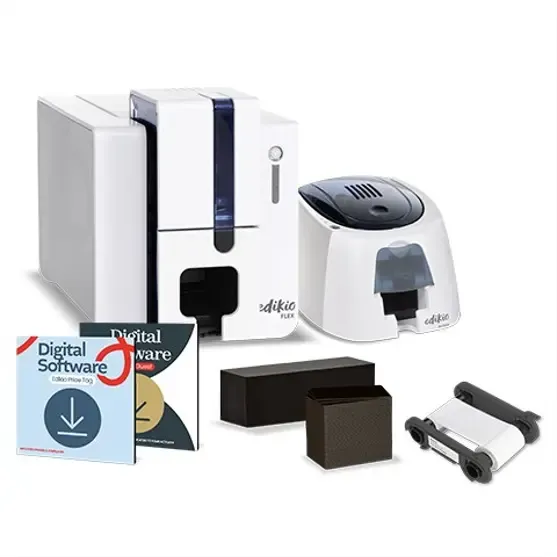
Not every printer is designed to handle plastic cards, and not every card printer offers the same combination of quality, speed, and functionality. For a business planning to produce identification, membership, access, or loyalty cards, choosing equipment requires more thought than simply comparing prices.
A reliable printer for plastic cards should fit the organisation's card material, design requirements, workload, and day-to-day workflow. Understanding the features that actually matter can make the selection process much easier.
The Foundation: Printing Technology
The printing method is one of the first specifications worth investigating.
Two common approaches are direct-to-card and retransfer printing. Direct-to-card systems print onto the card itself, while retransfer equipment applies an image through an intermediate film.
The better option depends on what you are trying to achieve.
Match Technology to the Finished Card
If the card has a relatively straightforward design and does not require full edge coverage, direct printing may be suitable.
For detailed designs or applications where surface coverage and presentation are particularly important, retransfer technology may be worth considering.
There is no universal answer. The application should guide the technology.
Print Quality Is More Than Resolution
When comparing a plastic card printer, buyers often look immediately at resolution. Although resolution matters, it is only one part of the quality equation.
The final appearance can also depend on:
- Card surface
- Ribbon quality
- Colour management
- Software
- Image quality
- Printer calibration
- Maintenance
A photograph printed on a poor-quality card will not necessarily look professional simply because the printer has a high resolution specification.
Single-Sided or Dual-Sided?
Think about how much information needs to appear on each card.
A simple employee ID may only require a photograph, name, and company information on the front. Other cards may need terms, contact details, barcodes, or instructions on the reverse.
If both sides are regularly required, a dual-sided printing capability can make the process more efficient.
Plan the Layout Before Buying
Sketching the card layout can be surprisingly helpful. Mark where the following elements need to appear:
- Photograph
- Name
- Identification number
- Logo
- Barcode or QR code
- Expiry date
- Contact information
This gives you a clearer idea of the printer functionality you need.
Speed and Production Capacity
Printer speed becomes increasingly important as card volume grows.
If an organisation produces only a handful of cards each week, maximum speed may not be a major concern. But a department issuing dozens or hundreds of cards needs equipment capable of handling its workload efficiently.
A suitable card printer machine should be evaluated against realistic production requirements rather than an occasional peak or theoretical maximum.
Think Beyond the First Year
A printer may initially be purchased for a small project, but business needs can change. Staff numbers may increase, membership programmes may expand, or new card-based processes may be introduced.
Selecting equipment with reasonable capacity for expected growth can help avoid an early replacement.
Connectivity and Integration
The printer should work comfortably with the systems used by your organization.
Depending on the model and environment, businesses may require direct computer connectivity or network-based operation.
Integration is especially important when card information is stored digitally. A smooth workflow can reduce manual data entry and help minimize printing errors.
Consumables and Ongoing Maintenance
A printer cannot operate without appropriate cards and printing consumables. These recurring requirements should be included in the buying decision.
Ask about:
- Ribbon availability
- Supported card stock
- Cleaning requirements
- Replacement components
- Maintenance procedures
- Typical operating costs
The purchase price alone does not tell you what the printer will cost over time.
Avoid Unexpected Running Costs
A useful way to compare options is to estimate the cost of producing a typical batch of cards. Include both the blank cards and printing consumables.
This can provide a more meaningful comparison than simply looking at two machine prices.
Personalization Features
Many modern cards contain personalized information. A suitable system may need to print photographs, names, identification numbers, barcodes, QR codes, or other variable data.
If your cards use magnetic stripes or embedded chips, check compatibility carefully.
The more specialised the card, the more important it becomes to confirm the entire system before purchase.
User Experience Matters
A technically capable machine can still be frustrating if everyday operation is unnecessarily complicated.
The people using the printer should be able to understand the basic workflow without extensive technical knowledge.
Useful characteristics include:
- Straightforward controls
- Clear software
- Easy media loading
- Simple maintenance procedures
- Accessible consumables
- Consistent printing
A user-friendly card printer machine can save staff time and reduce avoidable errors.
Why Choose Us
We believe card printing equipment should be selected according to practical requirements rather than marketing terminology alone. Customers benefit from understanding what each feature means for their actual card production process.
Our approach focuses on clear information, suitable equipment options, and customer needs. Whether the priority is appearance, production efficiency, personalisation, or ease of operation, the decision should be based on the complete workflow.
About Us
Our role is to help businesses and organizations understand the practical side of card printing. We focus on solutions that make sense for the intended application rather than assuming every customer needs the same machine.
A clear understanding of card design, material, volume, and operating requirements can help customers create a more efficient printing environment.
Final Considerations
A good printer for plastic cards combines appropriate printing technology with dependable operation, suitable card compatibility, useful software, and manageable running costs.
Before buying a plastic card printer, consider the type of cards you produce, how often you print them, how much information each card contains, and how long the cards need to remain presentable.
The right card printer machine should make card production easier, not create another complicated task for your team