What Are Digital Mailroom Services and How Do They Work?
By jamesthomas
124 Views
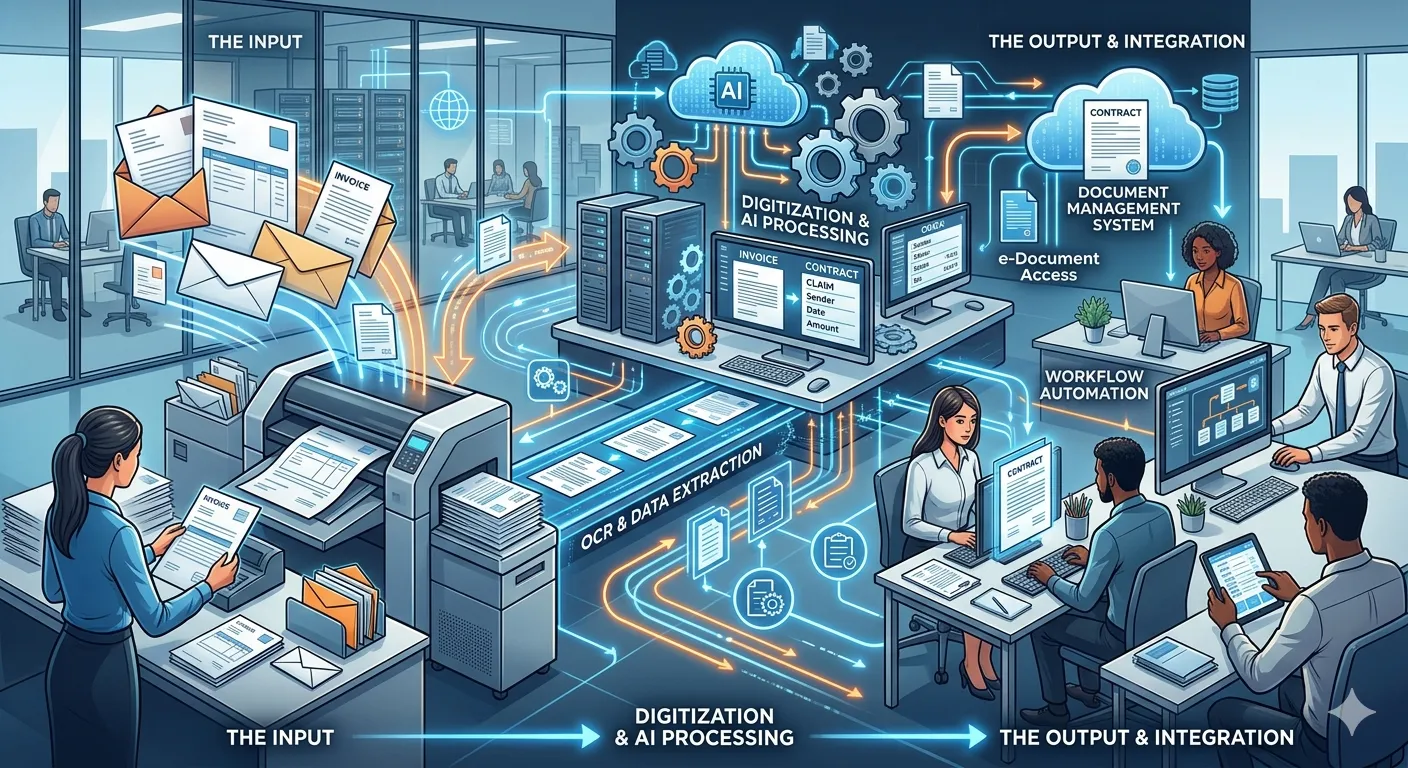
Mail may look simple from the outside, but inside a business it can create delays, confusion, and compliance risk if it is handled manually. Invoices, contracts, claims, applications, customer forms, employee records, and legal notices all need to reach the right team quickly. Docbyte's Digital Mailroom Services help businesses turn incoming paper and digital documents into organized, trackable, and usable information.
A digital mailroom replaces slow manual mail handling with a structured document intake process. Instead of sorting physical mail by hand, scanning documents without context, or forwarding files through email chains, businesses can capture, classify, route, and manage documents more efficiently.
What Are Digital Mailroom Services?
Digital mailroom services are solutions that receive, scan, classify, and route incoming business documents. These documents may come from physical mail, email attachments, online forms, shared folders, or other digital channels.
The goal is simple: move documents from arrival to action faster.
A digital mailroom does not only convert paper into PDFs. That is just scanning. A true digital mailroom adds structure to the process by identifying document types, extracting useful information, sending records to the right department, and keeping a clear trail of activity.
Businesses use digital mailroom services to manage documents such as:
- Supplier invoices
- Customer forms
- Legal notices
- Insurance claims
- Contracts and agreements
- HR documents
- Financial records
- Government correspondence
- Compliance documents
- Application forms
This makes the mailroom less of a physical sorting desk and more of a document control center.
How Digital Mailroom Services Work
Digital mailroom services usually follow a clear process. The exact setup may vary by business, but the core workflow is usually similar.
1. Documents Are Received
Documents enter the business through different channels. Some arrive as physical mail. Others come through email, portals, upload forms, or internal systems.
A digital mailroom brings these intake channels into a more controlled process. This helps reduce the risk of documents sitting unnoticed in inboxes, desk trays, or local folders.
2. Paper Documents Are Scanned
Physical mail is opened, prepared, and scanned. The goal is to create a clear digital version of the original document.
Good scanning is not just about image quality. It also includes proper document separation, page order, indexing, and quality checks. If the scan is poor, the whole workflow suffers.
3. Documents Are Classified
Once documents are captured, they need to be identified. Is it an invoice? A contract? A customer request? A claim form? A legal notice?
Classification helps the system understand what kind of document it is dealing with. This is important because different document types require different workflows, approvals, storage rules, and retention periods.
4. Key Information Is Extracted
After classification, important data can be pulled from the document. For example:
- Invoice number
- Supplier name
- Customer name
- Contract date
- Policy number
- Case reference
- Employee ID
- Due date
- Department name
This information helps teams search, process and route the document without manually typing everything into another system.
5. Documents Are Routed to the Right Team
Once the document is identified and indexed, it can be sent to the correct department, person or business system.
For example:
- Invoices go to finance
- Employee forms go to HR
- Claims go to the claims team
- Contracts go to legal
- Customer requests go to service teams
This reduces manual forwarding and helps prevent important documents from being missed.
6. Records Are Stored and Tracked
The final step is controlled storage. Documents should be stored in a way that makes them easy to find, secure, and connected to the right business process.
A good digital mailroom also keeps activity history, so businesses can see when a document arrived, who handled it, where it was routed, and what action was taken.
Why Businesses Use Digital Mailroom Services
Manual mail handling creates hidden friction. It may seem manageable when document volumes are low, but as a business grows, small delays become expensive.
Docbyte's Digital Mailroom Services help businesses improve how documents move from intake to processing. This is especially useful for organizations dealing with high document volumes, multiple departments, remote teams, or strict compliance requirements.
Key Benefits of Digital Mailroom Services
1. Faster Document Processing
Manual sorting, scanning, and forwarding can slow everything down. A digital mailroom helps documents reach the right people faster.
This can improve response times for customers, suppliers, employees, and internal teams.
2. Better Visibility
With manual mail, it is often difficult to know where a document is. Someone may have opened it, scanned it, emailed it, printed it, or placed it in a folder.
A digital mailroom gives teams better visibility into document status and movement.
Businesses can track:
- When a document arrived
- What type of document it is
- Who received it
- Where it was routed
- Whether action is still pending
3. Less Manual Data Entry
Typing information from documents into systems is slow and error-prone. Digital mailroom services can reduce manual entry by extracting key data from incoming documents.
This helps teams save time and reduces mistakes caused by retyping names, dates, numbers, or reference codes.
4. Stronger Compliance Control
Important business documents need proper handling. If records are lost, delayed, or stored incorrectly, compliance risk increases.
A digital mailroom helps create a more controlled intake process. It supports better access control, clearer audit trails, and more consistent document handling.
5. Improved Remote Work Support
When mail is handled physically, remote teams depend on someone in the office to scan, forward, or explain what arrived.
A digital mailroom makes incoming documents available through digital workflows, helping distributed teams work without waiting for physical handoffs.
Common Problems With Manual Mailrooms
Many businesses continue using manual mailroom processes because they seem familiar. The problem is that familiar does not always mean reliable.
Common manual mailroom problems include:
- Documents sitting unopened
- Mail going to the wrong department
- Delays in invoice approvals
- Lost customer forms
- Duplicate scanning
- Weak tracking
- Poor document naming
- Sensitive files sent through unsecured email
- No clear audit trail
- Too much dependence on individual employees
These issues can damage productivity and make document control harder than it needs to be.
Best Practices for a Better Digital Mailroom
A digital mailroom works best when it is planned properly. Businesses should not only scan documents and hope the process improves.
Define Document Categories
Start by identifying the main types of documents your business receives. Each category should have a clear owner, workflow, and storage rule.
Standardize Intake Channels
Too many intake channels create confusion. Businesses should reduce scattered document entry points where possible and bring them into a controlled process.
Use Clear Routing Rules
Documents should not depend on guesswork. Define where each document type should go and who is responsible for action.
Protect Sensitive Information
Mail often contains confidential data. Access permissions, secure storage, and activity tracking should be part of the process from the start.
Review and Improve the Workflow
A digital mailroom should not be set once and forgotten. Teams should review delays, errors, exceptions, and bottlenecks over time.
Conclusion
Digital mailroom services help businesses move away from slow, manual document handling and toward a more structured way of managing incoming information. They improve speed, visibility, accuracy, and control across the document intake process.
For businesses handling large volumes of mail, sensitive documents, or compliance-driven workflows, a digital mailroom can reduce friction and make daily operations more reliable.
Docbyte's Digital Mailroom Services provide a practical way to capture, classify, route, and manage incoming documents so teams can act faster and protect business records more effectively.