The Table That Talks Back: Inside the World of Interactive Smart Tables
9 Views
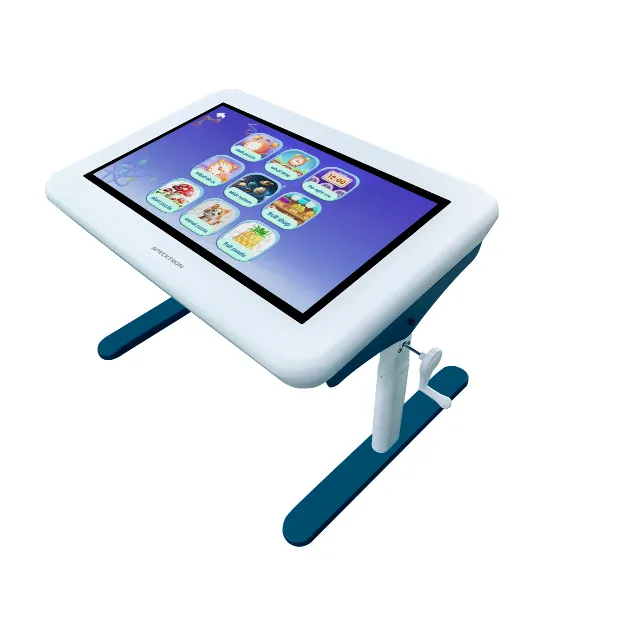
Imagine sitting around a table where you can move objects on the surface, explore digital information with your fingertips, draw ideas, and work with others without needing a separate computer or projector. It may sound futuristic, but interactive smart tables are making this kind of experience possible in classrooms, offices, museums, healthcare facilities, and public spaces.
Traditional tables provide a place to sit, write, discuss, and work. Interactive smart tables take these everyday activities a step further by combining a physical surface with touchscreen technology and digital applications. They allow people to interact directly with information, making collaboration more visual, engaging, and convenient.
But what exactly makes these tables smart, and how can they improve the way people learn, work, and share ideas? Let's explore the technology behind them and the different ways they are being used.
What Is an Interactive Smart Table?
An interactive smart table is a digital table equipped with a touchscreen surface that allows users to interact with content using their fingers or compatible input devices.
Unlike a conventional table, which requires separate equipment for displaying digital information, an interactive table combines the screen and work surface into one unit. Depending on its design, it may include a built-in computer, operating system, speakers, wireless connectivity, and specialised applications.
Users can tap icons, move digital objects, write notes, zoom into images, and explore information directly on the tabletop.
For example, students can work together on a digital map, business teams can organise ideas during a planning session, and museum visitors can explore interactive exhibits by touching the screen.
Some models are designed for horizontal use, while others feature adjustable angles or configurations suited to particular environments.
The main purpose is to make digital interaction feel more natural by placing information directly where people are sitting, discussing, or working together.
How Does an Interactive Smart Table Work?
Although the design varies between models, most interactive smart tables combine several technologies to create a responsive digital surface.
Touchscreen technology: The screen detects touch input and allows users to interact with digital content. Depending on the model, it may support multiple simultaneous touch points, enabling several people to work on the surface together.
Display technology: The built-in display presents text, images, videos, diagrams, and applications. Screen resolution, brightness, and viewing angles influence how clearly people can see the content.
Computing and software: Integrated computing hardware or a connected computer runs the operating system and applications. These tools determine what users can do, from displaying presentations to solving educational activities.
Connectivity: Depending on the model, ports and wireless connections allow users to connect external devices, access supported online resources, or share content from compatible computers and mobile devices.
Audio support: Integrated speakers can provide sound for videos, educational activities, presentations, and interactive demonstrations.
Together, these components turn a regular tabletop into a shared digital workspace.
1. Making Classroom Learning More Interactive
One of the most useful applications of interactive smart tables is education. Students often benefit from activities that allow them to explore ideas rather than simply listen to explanations.
A smart table can support collaborative exercises, educational games, visual demonstrations, and group assignments.
For example, students learning geography can explore maps and identify countries together. In a science lesson, they can examine diagrams, arrange digital components, or discuss different stages of a process. Younger learners can practise counting, matching, spelling, and problem-solving through interactive activities.
The horizontal screen also creates opportunities for students to gather around one surface and participate as a group.
Teachers can use these activities to encourage discussion, teamwork, and active participation. However, the quality of the learning experience depends on the applications, lesson design, and guidance provided by the teacher, not simply on the presence of a touchscreen.
2. Helping Teams Collaborate in Business Meetings
Business meetings frequently involve brainstorming, planning, reviewing information, and making decisions.
Traditional meetings may rely on printed documents, laptops, whiteboards, and projectors. Switching between these tools can interrupt discussions or make it difficult for everyone to contribute.
An interactive smart table provides a shared digital surface where team members can review information, organise ideas, and work on visual materials together.
For instance, a marketing team can arrange campaign concepts on the screen, while a design team can review images and discuss changes. During project planning, team members may use compatible applications to organise tasks, map processes, or compare different approaches.
The advantage is that participants can work directly with the information in front of them.
For organisations that regularly conduct workshops and collaborative sessions, this approach can help create a more engaging meeting environment. The table should still complement suitable meeting software and established working practices.
3. Creating Engaging Experiences in Museums and Exhibitions
Museums, visitor centres, and exhibitions need ways to present information that capture attention and encourage exploration.
Interactive smart tables can turn displays into hands-on experiences. Instead of reading information from a fixed sign, visitors can explore digital collections, examine historical maps, view images, and discover additional information by touching the screen.
A history museum, for example, could allow visitors to explore a timeline of important events. An exhibition about architecture could present building designs that visitors can rotate, enlarge, or examine using compatible software.
These experiences can make information easier to explore at an individual pace while encouraging groups to discuss what they discover.
For public installations, durability, accessibility, ease of cleaning, and software reliability are particularly important because many different people may use the same surface throughout the day.
4. Supporting Healthcare and Patient Education
Healthcare facilities can also use interactive tables in selected settings, particularly where visual communication and shared information are helpful.
For example, a healthcare professional could use an interactive display to explain a general medical procedure, show an anatomical illustration, or guide a patient through educational information.
In rehabilitation or therapeutic environments, suitable interactive applications may support guided activities and exercises under professional supervision.
However, healthcare use requires careful attention to privacy, hygiene, and accessibility. Equipment must be appropriate for the environment, and any system handling patient information should follow applicable security and privacy requirements.
Interactive tables do not replace professional medical advice or specialised clinical equipment. Their value lies in supporting communication and selected activities.
5. Improving Public Spaces and Customer Experiences
Interactive smart tables can also be used in showrooms, retail environments, libraries, hospitality spaces, and customer experience centres.
In a showroom, visitors could explore product information, compare available configurations, or view interactive demonstrations. In a library, a table might provide access to digital resources or support collaborative learning activities.
Hospitality venues could use suitable interactive systems to present local information, event details, or visitor guides.
These applications work best when the interface is simple and the information is relevant to the people using it.
A complicated system can create frustration instead of improving the experience. Clear instructions, responsive touch controls, and well-organised content are essential for making public-facing installations useful.
What Should You Consider Before Choosing an Interactive Smart Table?
Not every interactive table is designed for the same purpose. Before selecting one, consider how it will be used and who will interact with it.
Screen size and resolution: Choose a surface that provides enough space for the expected number of users and displays content clearly.
Multi-touch capability: If several people will use the table simultaneously, check its supported touch points and how accurately it responds to multiple users.
Software compatibility: Make sure the available applications support your intended activities, whether they involve education, presentations, digital exhibits, or collaboration.
Build quality: Consider the table's structure, surface durability, stability, and suitability for frequent use.
Connectivity: Check whether it supports the required ports, wireless connections, network access, and external devices.
Ease of maintenance: Look for a design that allows straightforward cleaning, software updates, and technical servicing.
Accessibility and ergonomics: Consider seating arrangements, screen visibility, reach, and whether users with different physical needs can interact comfortably.
It is also important to evaluate the total cost, including installation, software licences, training, maintenance, and technical support.
The Future of Interactive Smart Tables
As digital collaboration continues to develop, interactive smart tables may become increasingly connected with other workplace and learning technologies.
Future implementations may combine touchscreen interaction with 3D visualisation, collaborative applications, artificial intelligence features, and connected digital workspaces. The availability of these capabilities will depend on the specific hardware, software, and integrations.
The most meaningful developments will be those that solve practical problems rather than adding technology for its own sake.
A useful interactive table should make it easier for people to understand information, contribute ideas, and complete tasks together.
Conclusion
Interactive smart tables demonstrate how an everyday object can become a powerful digital tool. By combining touchscreen technology, computing, and collaborative applications, they create opportunities for more engaging learning, productive discussions, and interactive public experiences.
Their usefulness extends across education, business, exhibitions, healthcare, and customer-facing environments. However, choosing the right solution requires a clear understanding of the users, applications, space, and long-term support requirements.
The table is no longer just a place to put things. It can become a place where ideas come to life, information responds to touch, and people work together in entirely new ways.