The Best 14″ All-in-One POS for Cafes, Boutiques, and Quick-Service Restaurants
By Almoeqatar
16 Views
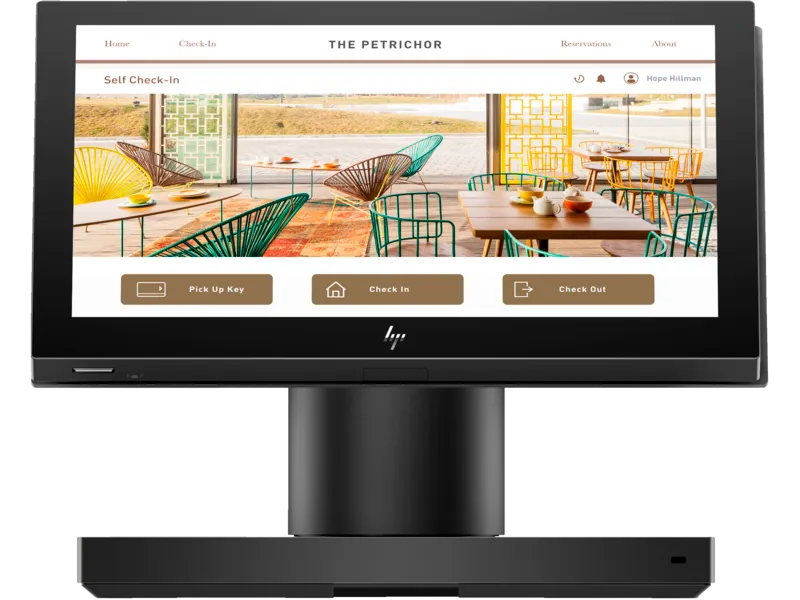
Running a cafe, boutique, or quick-service restaurant involves much more than serving customers or selling products. Businesses need to manage orders, process payments, track inventory, generate bills, and keep daily operations running smoothly. When customer traffic increases, handling these activities manually or through disconnected systems can become challenging.
This is where a 14″ All-in-One POS system can make a difference. Combining essential point-of-sale hardware into one compact setup, it helps businesses manage transactions and everyday activities without requiring multiple bulky devices.
Its touchscreen interface, space-saving design, and practical functionality make it a suitable option for businesses looking to improve their checkout experience.
Let's explore why a 14-inch all-in-one POS can be a useful addition to modern cafes, boutiques, and quick-service restaurants.
1. What Makes a 14″ All-in-One POS Different?
A traditional point-of-sale setup may include a computer, monitor, keyboard, mouse, and other connected accessories. Managing all these components can take up valuable counter space.
An all-in-one POS brings essential computing and display components together in one terminal. Many models feature a touchscreen interface, integrated processing hardware, multiple connectivity options, and a compact design.
The 14-inch screen offers a practical balance between visibility and space efficiency. Employees can navigate menus, select products, enter orders, and process transactions through the touchscreen.
Depending on the configuration, businesses can connect additional peripherals such as barcode scanners, receipt printers, cash drawers, and payment terminals.
This makes the system adaptable to different business environments.
2. Why Is a 14-Inch Screen a Practical Choice?
Screen size plays an important role in choosing a POS terminal. A display that's too small may make product selection and billing difficult, while an oversized terminal can occupy unnecessary counter space.
A 14-inch touchscreen offers a convenient middle ground.
Some of its practical advantages include:
-
Easy navigation: Employees can access menus and transaction options through a touchscreen interface.
-
Space efficiency: Its compact footprint helps keep checkout counters organised.
-
Better visibility: Product names, order details, and billing information can be displayed clearly when the software is properly designed.
-
Convenient operation: Staff can perform routine checkout activities without depending on a separate keyboard and mouse.
For businesses with limited counter space, these features can help create a more organised working environment.
3. How Cafes Can Benefit from an All-in-One POS
Cafes often experience changing customer volumes throughout the day. Morning coffee orders, lunch crowds, and takeaway requests can create busy periods where quick order processing matters.
A 14″ All-in-One POS can help cafe staff manage these activities more efficiently.
Faster Order Management
Employees can select beverages, food items, sizes, and customisations through the POS software. This helps organise orders and reduces the need for handwritten notes.
Better Billing Experience
A touchscreen POS can simplify billing by allowing staff to select products, apply eligible discounts, and generate customer bills.
Improved Daily Operations
Depending on the software, cafe owners can review sales reports, monitor popular menu items, and track daily transactions.
Peripheral Connectivity
A compatible receipt printer can generate bills, while a cash drawer can support cash transactions. Kitchen printers may also be connected where supported.
Together, these features can help cafes maintain a more organised checkout process.
4. Why Boutiques Need a Compact POS System
Boutiques handle a different set of operational requirements compared with food businesses.
They may sell products in different sizes, colours, styles, and categories. Keeping track of these variations can become difficult without an organised billing and inventory system.
A touchscreen POS can make product selection and checkout more convenient.
Product and Inventory Management
With suitable POS software, boutique owners can maintain product records, monitor stock levels, and track sales.
Barcode Scanning
When supported, barcode scanners can help employees identify products quickly and reduce manual data entry.
Simplified Billing
Staff can select products, calculate totals, and generate receipts through one interface.
Sales Tracking
Sales reports can help business owners understand which products are performing well and identify inventory that may need replenishment.
For boutiques with limited checkout space, a compact all-in-one terminal can also help maintain a clean and professional counter.
5. Supporting Faster Service in Quick-Service Restaurants
Quick-service restaurants depend on speed, order accuracy, and smooth coordination between front-counter employees and kitchen staff.
During peak hours, even small delays can affect the customer experience.
A 14-inch POS terminal can support daily restaurant operations in several ways.
-
Quick order entry: Employees can select menu items and customisations through the touchscreen.
-
Order modifications: Supported software can manage additions, removals, and special instructions.
-
Kitchen coordination: Compatible kitchen display systems or printers can receive order information.
-
Payment processing: Businesses can connect supported payment terminals for card and digital transactions.
-
Sales monitoring: Managers can review transaction records and sales performance.
When integrated with suitable restaurant management software, the POS can become an important part of the entire ordering process.
6. Important Features to Consider Before Choosing a 14″ POS
Not every POS terminal offers the same capabilities. Before selecting a system, businesses should consider their operational requirements.
Touchscreen Performance
Look for a responsive touchscreen that supports frequent daily interactions. The interface should remain easy to use during busy checkout periods.
Processor and Memory
The processor and RAM influence how smoothly the POS software operates. Choose specifications that match the software requirements and expected workload.
Storage Capacity
Adequate storage is important for running applications and maintaining local transaction data where applicable.
Connectivity Options
Check whether the terminal supports the connections your business needs, such as USB, LAN, Wi-Fi, Bluetooth, and other available interfaces.
Peripheral Compatibility
Make sure the system can work with the required barcode scanners, receipt printers, cash drawers, and payment devices.
Durability and Service Support
Retail and restaurant environments involve frequent usage. Consider build quality, warranty coverage, replacement parts, and technical support before purchasing.
7. How an All-in-One POS Improves the Customer Experience
A good checkout experience can influence how customers feel about a business.
Long queues, incorrect bills, and slow payment processing can create frustration, particularly during busy periods.
An appropriately configured POS system helps employees handle transactions in a more organised manner.
Customers benefit from clearer billing, fewer manual entry steps, and a more structured checkout process.
For businesses, this can improve staff coordination and help create a consistent service experience.
However, the overall performance also depends on the POS software, internet connection, payment integration, and staff training.
8. Is a 14″ All-in-One POS the Right Investment?
A 14-inch all-in-one terminal can be a practical choice for businesses that need a compact and organised checkout solution.
It is particularly useful for:
-
Small and medium-sized cafes.
-
Independent boutiques.
-
Quick-service restaurants.
-
Bakery and takeaway counters.
-
Convenience stores.
-
Small retail outlets.
Before investing, consider your daily transaction volume, software requirements, peripheral needs, and available counter space.
A suitable POS system should support current business activities while offering enough flexibility to accommodate future requirements.
Frequently Asked Questions
1. What is a 14″ All-in-One POS?
It is a compact point-of-sale terminal that combines a display and computing hardware into one unit, helping businesses manage billing and transactions.
2. Is a 14-inch POS suitable for cafes?
Yes. It can support order entry, billing, and payment workflows when paired with suitable cafe management software.
3. Can boutiques use an all-in-one POS?
Yes. Boutiques can use it for product billing, inventory tracking, barcode scanning, and sales reporting, depending on the software.
4. Can a POS terminal connect to a receipt printer?
Most commercial POS terminals offer connectivity options for compatible receipt printers. Always check the available ports and software compatibility.
5. Does an all-in-one POS support inventory management?
Inventory management is generally provided through the POS software rather than the hardware itself. Features vary between software providers.
6. What should I check before purchasing a POS terminal?
Consider screen size, processor, RAM, storage, connectivity, peripheral compatibility, durability, warranty, and technical support.
Conclusion
Choosing the right point-of-sale system can make everyday business operations more organised and manageable. For cafes, boutiques, and quick-service restaurants, a 14″ All-in-One POS offers a practical combination of compact design, touchscreen convenience, and connectivity.
From processing customer orders to supporting billing and inventory activities, it can help reduce checkout complexity and improve staff workflows.
The key is to select a terminal that matches your business requirements, works with your preferred POS software, and supports the peripherals needed for daily operations. A well-planned POS setup isn't just about processing payments; it's about creating a smoother experience for both employees and customers.