How Storage and Charging Systems Support Modern VR Learning Environments
By abcom africa
76 Views
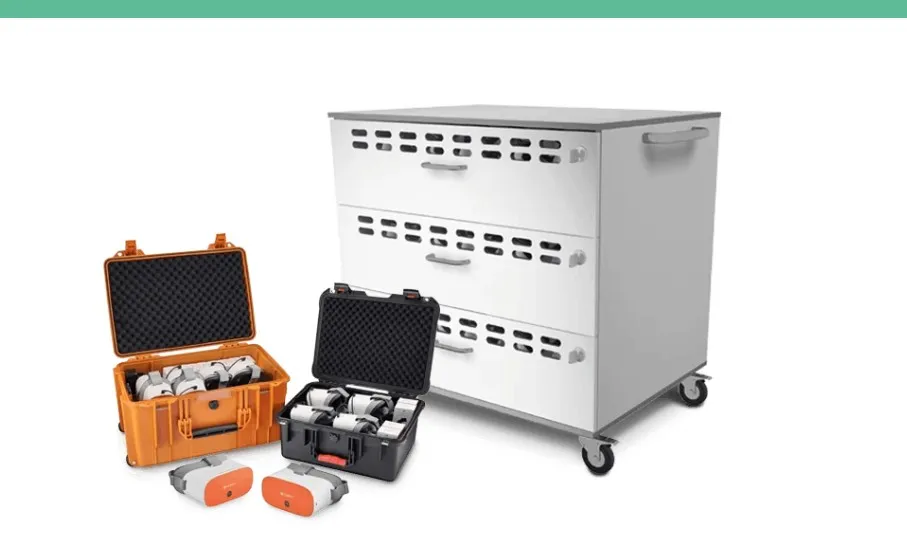
Virtual reality, or VR, is changing the way students learn and experience new subjects. Instead of only reading a chapter in a textbook or watching a video, students can use a VR headset to enter a digital environment and explore it themselves. They can visit a virtual historical place, study the human body, explore space, practice technical skills, or experience a science experiment in a safe digital environment.
As schools and training centers start using more VR headsets, another important question comes up: Where should all these devices be kept and charged when they are not being used?
This may sound like a small issue, but it becomes important when a classroom has 10, 20, 30, or more VR headsets. Each headset may also have controllers, charging cables, adapters, and other accessories. Without proper organization, these items can easily become mixed up, damaged, or difficult to find.
This is where VR storage and charging systems become useful. They provide one organized place to store, charge, and protect VR equipment. They can also make it easier for teachers to prepare for lessons and return equipment after class.
In simple terms, a good storage and charging system helps make sure that VR equipment is safe, organized, charged, and ready when students need it.
Why VR Is Becoming Popular in Education
VR can make learning more interactive. In a normal classroom, students usually learn by reading, listening, watching videos, looking at pictures, or using physical models. These methods are useful, but they cannot always show students what it feels like to be inside a particular environment.
VR can provide a different experience.
For example, students learning about the solar system could explore planets in a virtual space. Biology students could look at a three-dimensional model of the human body. History students could explore a virtual recreation of an ancient location. Engineering students could practice working with machines without having access to expensive physical equipment.
Research published in recent years has continued to study the use of immersive VR in education. A 2026 meta-analysis covering 33 studies from 2009 to 2025 found a positive effect of VR interventions on academic performance among K–12 learners.
The important point, however, is that VR alone does not automatically make a lesson better. Teachers still need good learning content, clear instructions, suitable activities, and a reliable way to manage the equipment.
That last part is often overlooked.
When students are ready for a VR lesson, teachers should not have to spend the first 15 minutes looking for chargers, checking batteries, finding controllers, or trying to figure out which headset belongs to which student.
This is why the supporting infrastructure matters just as much as the headset itself.
From Traditional Lessons to Immersive Learning
One of the biggest benefits of VR is that it allows students to experience some concepts instead of simply reading about them.
Imagine teaching students about the inside of a human heart. A textbook can show a picture. A video can explain how the heart works. A physical model can show its basic structure. With VR, students may be able to explore a three-dimensional digital model and examine different parts from different angles.
The same idea can be used in many subjects.
A geography lesson could take students inside a virtual environment. A history lesson could recreate an old city. A physics lesson could demonstrate forces and motion. A vocational training course could provide a simulated environment for practicing a procedure.
This type of learning can make difficult topics easier to understand because students can interact with the subject.
However, teachers need to prepare the equipment before the lesson. If the technology is not ready, the benefits of immersive learning can quickly disappear.
The Hidden Infrastructure Behind a VR Classroom
When people talk about VR in education, they usually talk about headsets, controllers, software, screen resolution, graphics, and applications. These are certainly important.
But there is another part of the system that students may never notice: storage, charging, maintenance, and organization.
Think about a classroom with 25 VR headsets.
After the lesson, all 25 headsets need to be returned. Their controllers also need to be returned. Charging cables need to be connected. Some equipment may need cleaning. A damaged headset may need to be separated from the working devices. Everything should then be stored safely until the next lesson.
Doing this manually can become confusing.
A dedicated VR storage and charging system gives every device a proper place. Instead of leaving equipment on desks or putting everything into a large cupboard, teachers and students can follow a simple return process.
The headset goes into its assigned space. The controllers go into their designated area. The charging connection is attached. The equipment is then ready for the next session.
This simple system can save time every day.
What Is a VR Storage and Charging System?
A VR storage and charging system is designed to keep VR equipment in one organized location while also allowing devices to charge.
Depending on the model, it may be a cabinet, charging cart, or another type of storage unit. Some systems are designed to stay in one classroom, while mobile carts can be moved from one room to another.
A typical system may provide space for:
- VR headsets
- Controllers
- Charging cables
- Power adapters
- Other VR accessories
Some systems also provide security features such as locks. Others focus on mobility, allowing teachers to move a complete set of VR equipment between classrooms.
The main purpose is simple: store the equipment safely and make charging easier.
This becomes especially useful when a school has several headsets that are shared between different students, teachers, or classrooms.
Keeping VR Headsets Ready for Every Class
One of the biggest problems with classroom technology is preparation.
A teacher may have planned a great VR activity, but if half the headsets have low batteries, the lesson may not go as planned.
Students may have to share devices. The teacher may have to stop the activity to find chargers. Some students may spend time waiting instead of learning.
A storage and charging system can help reduce these problems.
When headsets are returned to the charging system after every lesson, they have a regular place to recharge. This creates a simple routine.
At the end of the lesson:
- Students remove their headsets.
- Controllers are returned.
- Equipment is checked for problems.
- Devices are placed back into storage.
- Headsets are connected for charging.
By the time the next class starts, the equipment should be ready again.
This does not remove every technical problem, but it makes the daily process much easier.
Reducing Setup Time for Teachers
Teachers have many things to manage during a lesson. They need to explain the topic, answer questions, monitor students, manage the classroom, and make sure learning goals are being achieved.
They should not have to spend too much time managing equipment.
A centralized storage system can make the process more organized. Teachers know where the devices are kept, where the controllers belong, and where the chargers are located.
This is especially useful when several teachers use the same VR equipment.
Without a common system, one teacher might leave the devices on a desk while another puts them in a cupboard. One person may disconnect all chargers, while another leaves them connected.
A standard storage process avoids this confusion.
Everyone follows the same routine.
Meta has also highlighted the importance of managing multiple VR devices in educational environments. Its Meta for Education offering includes tools designed to help educators manage Quest devices.
As the number of devices grows, this type of organized management becomes increasingly important.
Protecting Expensive VR Equipment
VR headsets are not inexpensive classroom supplies. They contain electronic components, cameras, sensors, screens, batteries, and other delicate parts.
When equipment is left on desks or stored without proper organization, there is a greater chance of accidental damage.
For example, a controller could fall from a desk. A charging cable could be pulled. Two headsets could be placed on top of each other. Accessories could become lost.
A dedicated storage system gives each item a proper location.
This does not mean that equipment can never be damaged. Accidents can still happen. However, organized storage reduces some common risks.
A lockable cabinet or cart can also provide additional protection when the equipment is not being used.
This can be particularly helpful when expensive devices are shared between multiple classrooms or stored overnight.
Making Charging Easier
Charging one VR headset is simple.
Charging 30 headsets is a different story.
If every headset has a separate charger and all the cables are spread across a table, the classroom can quickly become messy. It can also become difficult to identify which cable belongs to which device.
A charging system brings these connections together.
Instead of having chargers across several desks, multiple devices can be charged in one organized location. Some charging carts are specifically designed for multiple educational devices, including VR equipment. Lenovo, for example, provides documentation for charging devices stored in a Bretford cart.
The exact charging method depends on the headset and charging system. Schools should always follow the manufacturer's instructions and use compatible cables and power adapters.
PICO, for example, recommends using the original cable and adapter when dealing with charging issues.
The goal is not simply to charge every device continuously. The goal is to create a safe and reliable charging routine so that devices have enough power when the next lesson begins.
Why Consistent Charging Matters
A VR lesson can be difficult to manage when batteries are unpredictable.
Imagine 25 students starting a lesson and five headsets showing low battery warnings. Those students may need to share devices or wait while equipment charges.
This creates interruptions.
A regular charging routine helps reduce this problem.
Teachers or support staff can check the equipment after a lesson and make sure that devices are returned to their charging positions. If a particular headset repeatedly fails to charge, the issue can be identified before the next class.
This is much better than discovering the problem when students are already waiting.
A charging system therefore becomes part of the school's daily technology routine.
Supporting Hygiene in Shared VR Environments
Another important issue with shared VR equipment is cleanliness.
VR headsets are worn on the face, so schools need a clear process for cleaning and maintaining devices between users. This becomes even more important when the same equipment is used by different classes throughout the day.
A storage system does not clean the headset automatically. However, it can make the cleaning process easier to organize.
For example, staff can create a simple routine:
- Used equipment is collected after class.
- Headsets are checked.
- Equipment is cleaned according to the school's procedure and manufacturer guidance.
- Any damaged equipment is separated.
- Ready-to-use equipment is returned to storage.
- Devices are connected for charging.
Having a fixed storage location makes it easier to follow this process consistently.
Helping Teachers Manage VR Equipment
Teachers should not need to be technology experts to use VR in their lessons.
The simpler the equipment process is, the easier it becomes for teachers to include VR activities in their regular teaching.
A well-organized storage system can reduce small problems that otherwise take up valuable time.
For example, if a teacher knows that headset number 10 always goes into slot number 10 and its controllers go into the matching section, there is less confusion.
Labels can make this even easier.
Schools can use simple numbers or names for devices. Students can be taught to return equipment to the correct location after use.
Over time, this creates a routine.
The goal is to make VR equipment management almost automatic.
Supporting a Growing VR Fleet
Many schools start small.
They may purchase five or ten headsets to test whether VR works well for their students. If the pilot is successful, they may later add more devices.
This is where storage planning becomes important.
A storage system that works for five devices may not be suitable for 30. As the number of devices increases, charging, organization, security, and maintenance become more difficult.
Schools should therefore think about future growth before choosing a storage solution.
Questions worth asking include:
- How many headsets are being used today?
- How many might be needed in the future?
- Will devices stay in one classroom?
- Will teachers move them between classrooms?
- Are controllers stored with the headsets?
- Is secure storage required?
- Who will manage charging?
- How will damaged equipment be identified?
Thinking about these questions early can prevent problems later.
Keeping the Classroom Safe and Organized
VR changes how students interact with the classroom.
When students wear a headset, they may not see what is physically around them. Depending on the VR activity, they may also move their hands or body.
This makes classroom organization important.
Charging cables should not be left across walking areas. Storage carts should not block doors or pathways. Equipment should be returned to its storage location after use.
A clean storage area helps keep the classroom clear when VR is not being used.
Teachers should also give students simple instructions about safe movement, handling controllers, removing headsets, and reporting problems.
Good storage cannot replace safety procedures, but it can support them.
Organizing Controllers, Cables, and Accessories
A VR headset is only one part of the equipment.
Controllers are equally important. So are charging cables, adapters, straps, and other accessories.
If these items are stored separately without clear organization, they can easily get lost.
Imagine having 20 headsets but only 17 working controllers. The remaining three headsets may not be useful for the planned activity.
This is why accessories should have designated storage areas.
Simple labeling can help.
For example, headset 01 can be paired with controller 01A and controller 01B. Headset 02 can have controller 02A and controller 02B.
This type of system may sound basic, but it can save a lot of time.
Cable management is also important. Properly organized cables are easier to find and less likely to become tangled or damaged.
The Role of VR Device Management Software
Physical storage solves one problem: where the equipment is kept.
Software can help solve another: how the devices are managed.
When a school has many VR headsets, staff may need to manage applications, settings, updates, user access, and other device functions.
This can become difficult if every headset needs to be managed separately.
Device management platforms can make the process easier by allowing administrators to manage multiple devices from a more centralized system.
Meta's education solutions, for example, are designed around managing Quest devices for educational use.
The combination of physical storage and software management creates a stronger overall system.
The cabinet or cart manages the physical equipment.
The software helps manage the digital side.
Together, they can reduce the amount of manual work required from teachers and technical staff.
Choosing the Right VR Storage and Charging System
There is no single storage solution that is perfect for every school.
A small classroom with eight headsets may need a simple solution. A large VR lab with 40 or 50 devices may need a much larger system.
Before buying a storage and charging solution, schools should think about how they will actually use it.
Important Features to Consider
- Capacity: Make sure the system can hold the required number of headsets and accessories.
- Charging: Check whether it supports the charging method required by the VR devices.
- Cable management: Look for a design that keeps cables organized and easy to access.
- Security: A lockable system may be useful if equipment needs to be protected when staff are not present.
- Mobility: If equipment needs to move between classrooms, a mobile cart may be more suitable than a fixed cabinet.
- Ventilation: Charging electronic equipment produces heat, so suitable ventilation and manufacturer guidance should be considered.
- Durability: Classroom equipment may be used frequently, so the storage system should be strong enough for regular use.
- Accessibility: Teachers should be able to access devices without unnecessary effort.
- Future growth: Consider whether additional headsets may be added later.
The right choice should be based on the school's actual needs rather than simply choosing the largest or cheapest option.
Common Problems Schools May Face
One common mistake is buying VR headsets first and thinking about storage later.
Once the devices arrive, schools may discover that the controllers need extra space, cables are difficult to organize, or the existing cupboard does not provide convenient charging.
Planning everything together can prevent these problems.
Another issue is charging capacity.
A school may have enough physical space for 30 headsets but not enough suitable charging capacity for all of them. Power requirements should therefore be considered during the planning stage.
There is also the question of responsibility.
Someone needs to make sure that devices are returned correctly, charging is completed, and damaged equipment is reported.
This does not necessarily need to be one person. Teachers and students can share simple responsibilities.
The important thing is to have a clear process.
VR Storage for Different Learning Environments
Different educational environments have different needs.
Schools
Schools may need mobile and easy-to-use systems. A charging cart can be useful when several teachers share the same VR equipment.
Universities
Universities may have larger VR fleets used by different departments. They may therefore need greater capacity, stronger security, and better device management.
Training Centers
Training organizations may use VR for professional development, technical training, or simulations. They may need equipment that can be prepared quickly between different groups.
Conclusion
VR can make learning more interactive, practical, and engaging. Students can explore places, objects, and ideas that may be difficult to experience in a traditional classroom.
But successful VR learning is not only about buying good headsets.
Schools also need a simple way to store, charge, protect, clean, and organize VR equipment.
This is where storage and charging systems become important.
A good system gives every headset and accessory a proper place. It keeps devices charging between lessons, reduces cable clutter, protects equipment, and makes it easier for teachers to prepare for the next class.
As schools move from small VR trials to larger VR programs, these benefits become even more important. Managing five headsets manually may be easy. Managing 30 or 40 devices every day requires a much more organized process.
The best VR learning environment is therefore not simply the one with the newest technology. It is the one where the technology is easy to use, properly maintained, safely stored, and ready when students need it.
When storage, charging, device management, and teaching work together, VR becomes more than an exciting piece of technology. It becomes a practical part of the modern learning environment.